What is full stack? A complete guide to full stack applications

Every app is made up of three fundamental parts: what users see, what happens behind the scenes, and where data lives. It’s what developers refer to as “full stack” — the layers of technology stacked on top of each other that make an app work in the wild.
As a user, you probably don’t think about any of this. You tap a button, see a result, and move on. After all, if an app does what it says on the tin, the underlying architecture is probably the last thing on your mind.
But with the rise of AI and vibe coding tools, pretty much anyone has the means to create custom tools. And understanding how those layers work together can be the difference between building an app that works and one that just looks like it does.
In this guide, we’ll break down the basics of full stack applications, how the different layers work together, and how you can build one yourself.
What does “full stack” actually mean?
You can think of stacks as the different layers that make up a whole application. A “full” stack refers to everything needed to make an app function as a complete system: the frontend, backend, and database.
Even if you’re new to the lingo, you’ve already experienced them in action. That’s because whenever you use an app, you’re triggering that entire stack to work together behind the scenes to process your action and produce a result.
Let’s say you’re using your favorite clothing app to buy that sweater you’ve had your eye on. First, you interact with the product on screen—browsing the item, selecting your size, and tapping “Buy now”—all of that’s the frontend.
Your action is then sent to the backend, where it gets processed (e.g. the system checks your payment details, shipping info, and stock availability, and communicates with a payment provider).
As part of that, the app interacts with a database, where app data is read and updated (e.g. your order is created, inventory is adjusted, and the payment status is recorded).
Finally, the result is returned to the frontend, and you see an order confirmation.
All of that—from what you see to what happens behind the scenes—is a full stack app working the way it should.
The three layers of app architecture
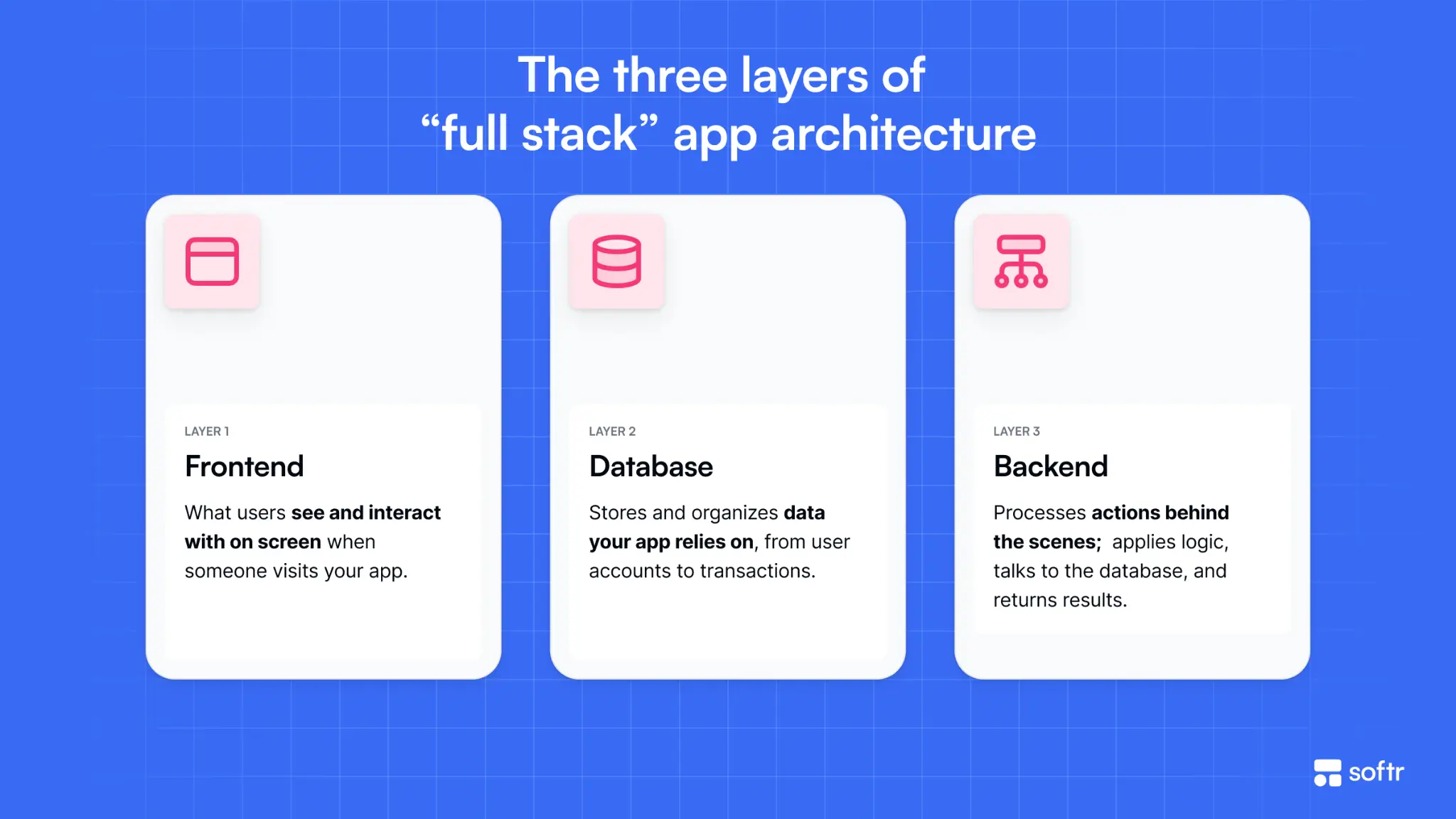
Now let's take a closer look at each layer in turn.
1. Frontend (what users see)
The frontend of any app is what users see and interact with. It’s the visual interface you use to browse, click, type, and navigate.
Developers use different coding languages to build out the frontend—like HTML to structure content on a page, CSS to shape the visual styling and design, and JavaScript to add dynamic, interactive elements. The frontend’s job is to present information clearly and respond to user input.
It handles things like:
- Rendering pages, buttons, forms, and layouts
- Capturing user input (clicks, typing, navigation)
- Sending requests to the backend
- Updating the interface based on responses
For example, when you type into a search bar and results appear, that’s the frontend handling input and updating what you see.
2. Backend (what happens when users click stuff)
The backend is the engine beneath the surface. It runs on a server (or several) and processes requests from the frontend, applies logic, interacts with your data, and returns a response.
The backend code is typically written with programming languages like JavaScript (Node.js), Python, or Ruby, along with frameworks like Express, Django, or Rails, which provide pre-built tools for handling requests, organizing code, and connecting to databases.
Essentially, the backend defines what happens when a user takes an action, enforces rules (like who can access or modify data), validates data before it’s stored, and coordinates communication between the frontend and the database. It handles:
- Authentication: handling sign-up, login, password security, and sessions so the app can recognize users securely
- Permissions: enforcing what a user is allowed to see or do based on their role (e.g. admin vs regular user)
- Business logic: defining the rules that define how your app behaves (e.g. preventing double bookings or only allowing cancellations within 24 hours)
- Database management: performing Create, Read, Update, and Delete (CRUD) actions on the database (where all your app information is stored)
- API layer: defining what requests the backend accepts and returns
- Security: validating input, preventing unauthorized access, and protecting the system from misuse or attacks
- Performance and scalability: ensuring the system responds quickly and can handle increasing numbers of traffic and requests
- Background tasks: Managing things like sending emails or processing payments or calling third-party APIs
For example, when you log into an app, the backend checks your credentials, verifies them against stored data, and determines whether to grant access.
3. Database (where information lives)
Every app needs to store data. For that you’ll need a database, which acts as your app’s long-term storage, like a memory bank. It’s where your application’s data is structured, stored, and retrieved in a way the rest of the app can reliably use. Depending on what your app actually does, that could involve anything from user accounts and orders to transactions and inventory.
In most databases, data is organized according to a schema, a defined blueprint that determines what data exists and how it relates. For example, a 'users' table might include fields like name, email, and created_at, while an 'orders' table might link each order to a specific user.
The backend interacts with the database to:
- Store new data (e.g. creating a user or saving an order)
- Retrieve existing data (e.g. loading a dashboard or profile)
- Update or delete data as needed (e.g. updating stock levels or cancelling orders)
Common types of databases include:
- Relational databases (structured, table-based) like PostgreSQL and MySQL, which use schemas and relationships between data
- Non-relational (NoSQL) databases like MongoDB and Firebase, which store data in more flexible formats like documents or key-value pairs
When it comes to full stack apps, the database doesn’t operate on its own — it’s accessed through the backend. When a user interacts with the frontend (like submitting a form or loading a page), the backend retrieves or updates data in the database, then sends the result back to the frontend to display.
In other words, the frontend handles what users see, the backend decides what happens, and the database stores the underlying data that powers your app. Everything users see and everything happening behind the scenes relies on it.
Traditional development vs vibe coding vs AI app builders
If you're reading this because you want to build your own full-stack app, there are a few ways to go about it, whatever your use case.
The traditional route is hiring a developer: a full-stack engineer or a team that can handle frontend, backend, and data management. While this gives you full control over the app’s underlying code, it's expensive and time-intensive, often requiring weeks or months to go from idea to production.
If you’re not a developer (and haven’t planned on hiring one), you might have tried your hand at vibe coding to get a working draft of your app. It feels easy: you simply prompt an AI assistant to generate code instead of writing it yourself, and re-prompt as you go to refine and debug your app.
A word of caution, though: vibe coding tools won’t magically create a full-stack app ready to share with users. They’re great at generating something that looks like a real app, but don’t be fooled by a polished UI.
Often, vibe coding generates an incomplete backend, meaning really all you have is a shiny demo. You’ll still need the technical know-how to configure backend components like security, permissions, and infrastructure yourself.
Then there are AI app builders. Like vibe coding, you describe what you want and the system generates it; but instead of leaving you to wire everything together, these platforms manage infrastructure, data, and security for you.
These tradeoffs are easier to see when you compare how each approach handles the full stack in practice:
How to build a full-stack app with Softr
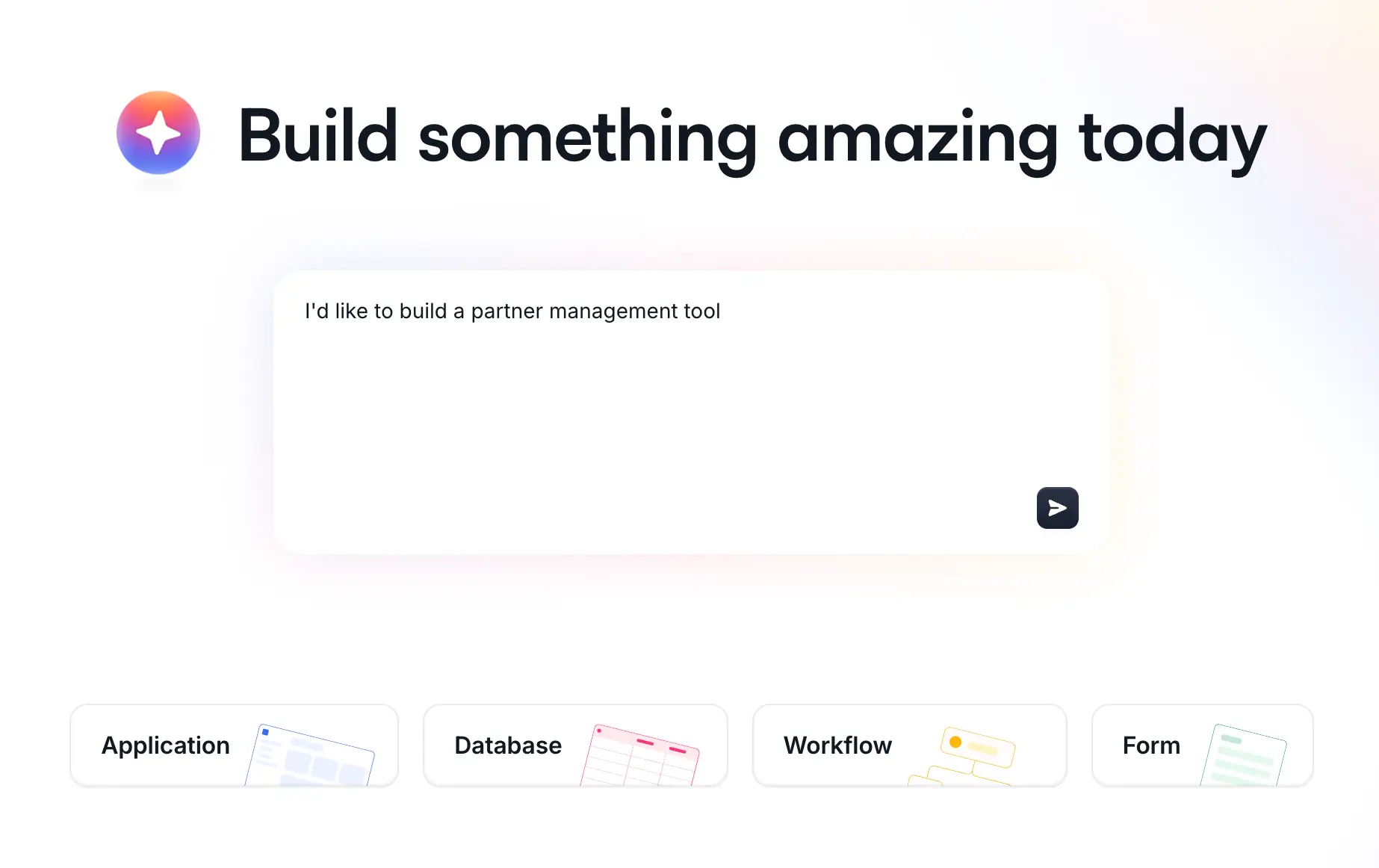
Let’s look at how a full-stack application comes together in practice using Softr — an AI app builder that generates a complete app from a simple prompt, connecting the frontend, backend, and database into a working system from the start.
When you open Softr, you’re prompted to interact with the AI Co-Builder. You describe your app in plain language, and the Co-Builder may ask a few follow-up questions—such as layout preferences, authentication settings, or user roles—to refine how the app is set up.
Once you confirm your choices, Softr builds your app in real time. In just a few minutes, you have a working application with the frontend, backend, and database already connected.
1. The interface
Softr generates the pages, layouts, and the flow through which users move through the application.
This means you start with:
- structured pages (dashboards, lists, detail views)
- navigation and layouts
- pre-built components like lists, tables, charts, calendars, and forms
Instead of designing everything from scratch, you get a working interface that’s already connected to your database (more on that later) and that reflects your use case.
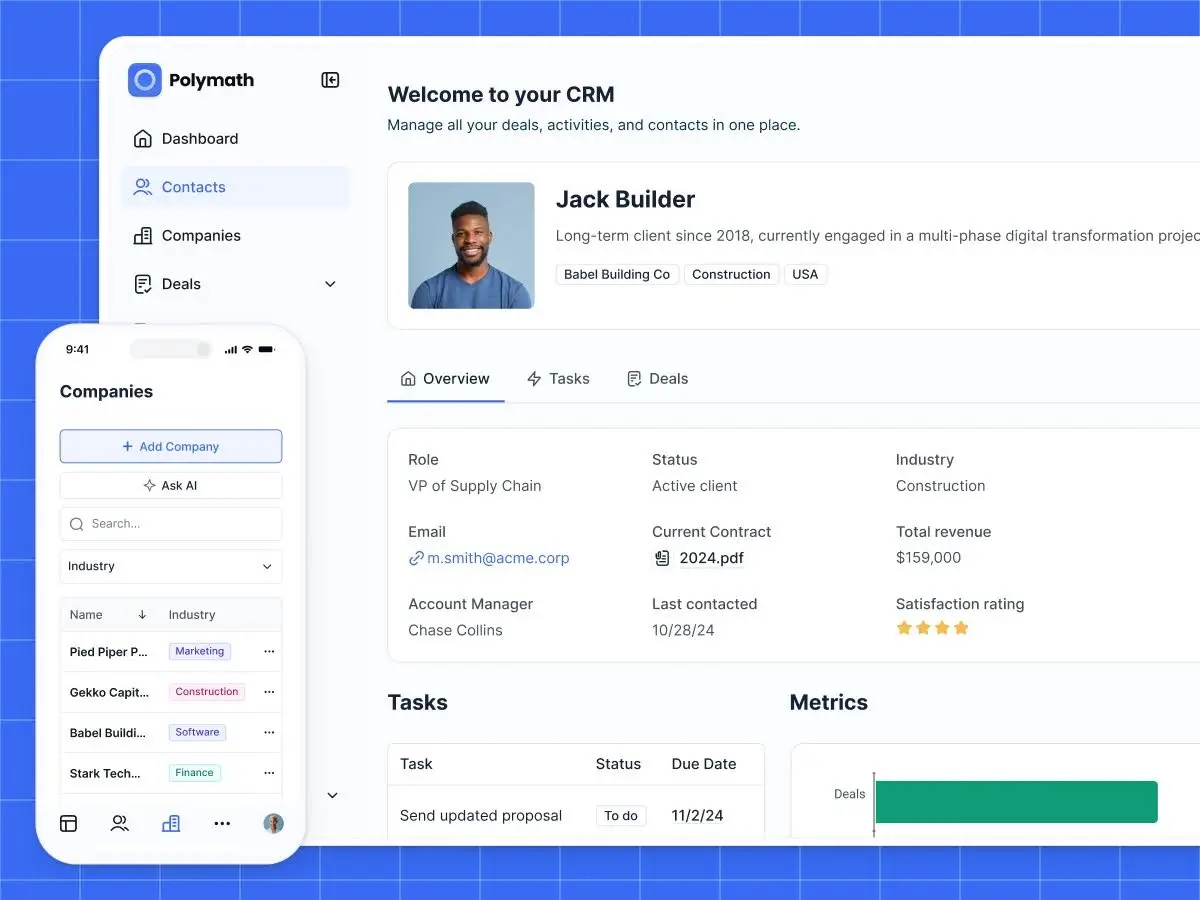
Crucially, this interface isn’t static — it’s interactive. Users can submit forms, click buttons, and navigate between pages, triggering actions that are handled behind the scenes by the backend and database.
From there, you can refine the UI in two ways:
- visually, by editing and rearranging components
- or with AI, by re-prompting changes and iterating on the design
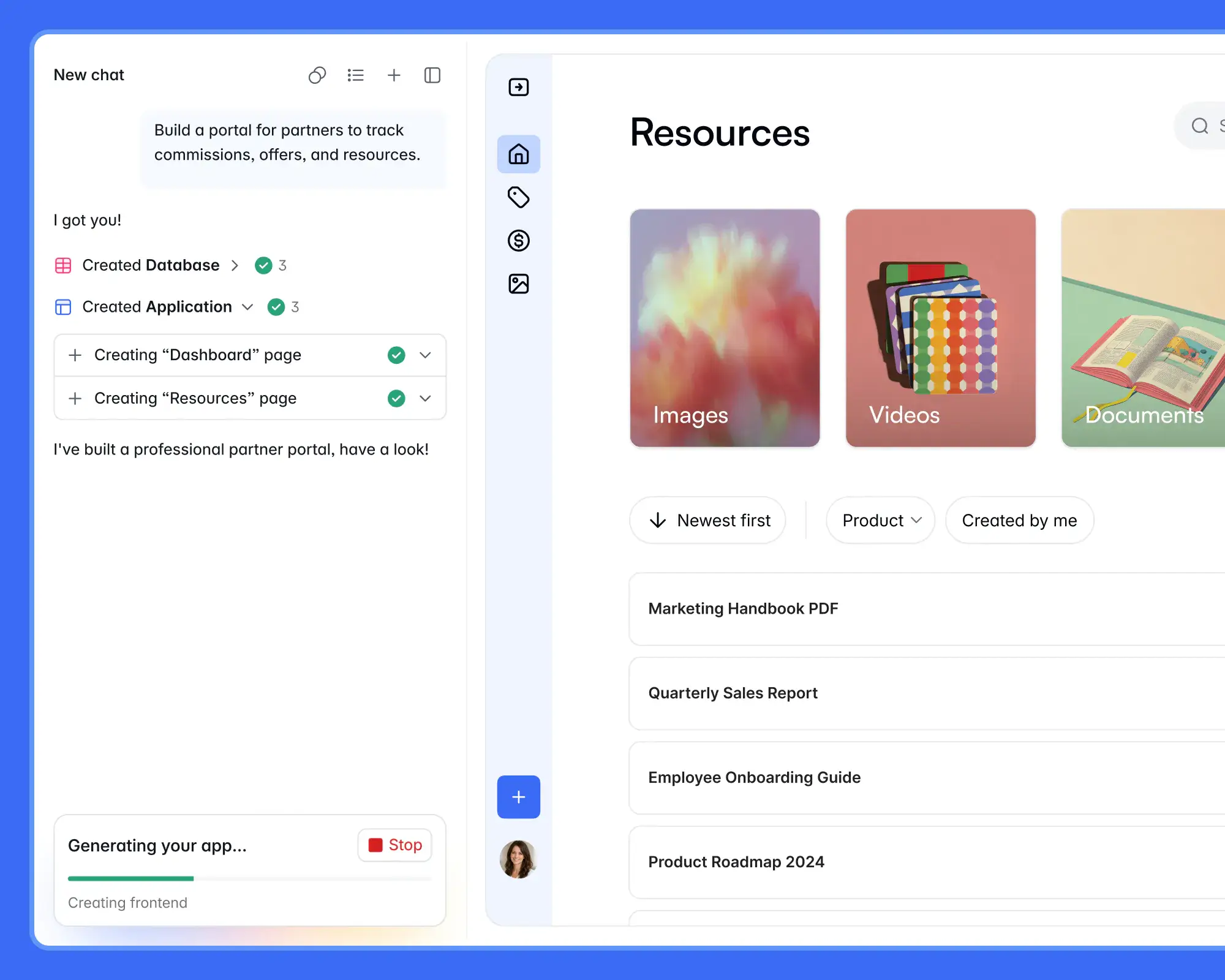
You can switch between these modes at any time, depending on how you prefer to work.
💡 Vibe code your own: If you need unique elements or interfaces in your app, you can use Softr’s vibe coding block to create your own design and logic—exactly the way you want.
2. The database
Softr also generates the data layer of your app: the database that stores and organizes the information your app runs on.
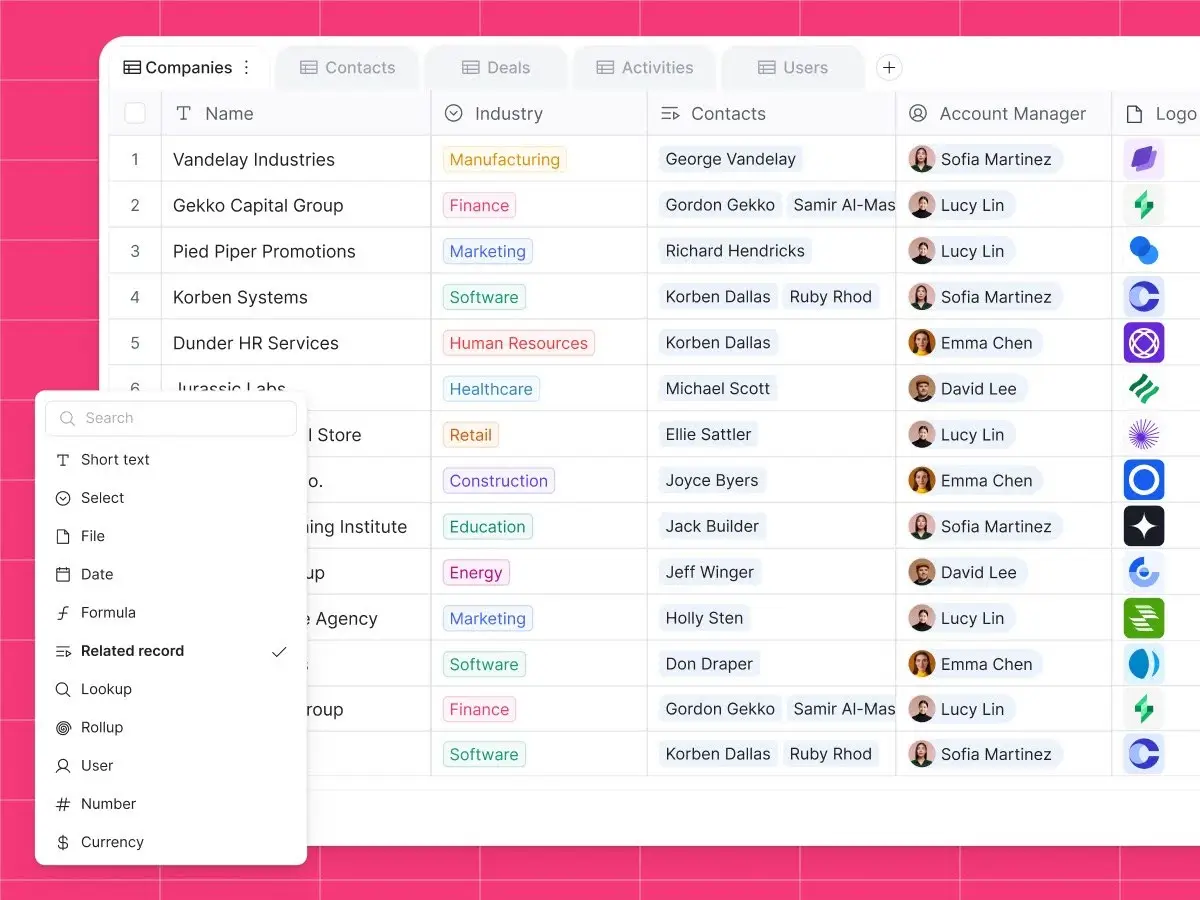
By default, this is a relational database, meaning data is structured into tables that are linked together through defined relationships.
For example, you might have separate tables for users, projects, and tasks — and connect them so each task belongs to a project, and each project belongs to a user.
Your database includes:
- Tables for different types of records
- Flexible field types within those tables (e.g. formulas, dropdowns, AI, etc)
- Relationships that connect data across tables
- Customizable views with filtering and sorting
These relationships are what make your data useful. They let your app tie information together and keep everything in sync across different parts of the system.
What makes this powerful is that the database is built directly into your app. When data is added or updated, it’s immediately reflected across your app in real time — no syncing or manual updates needed.
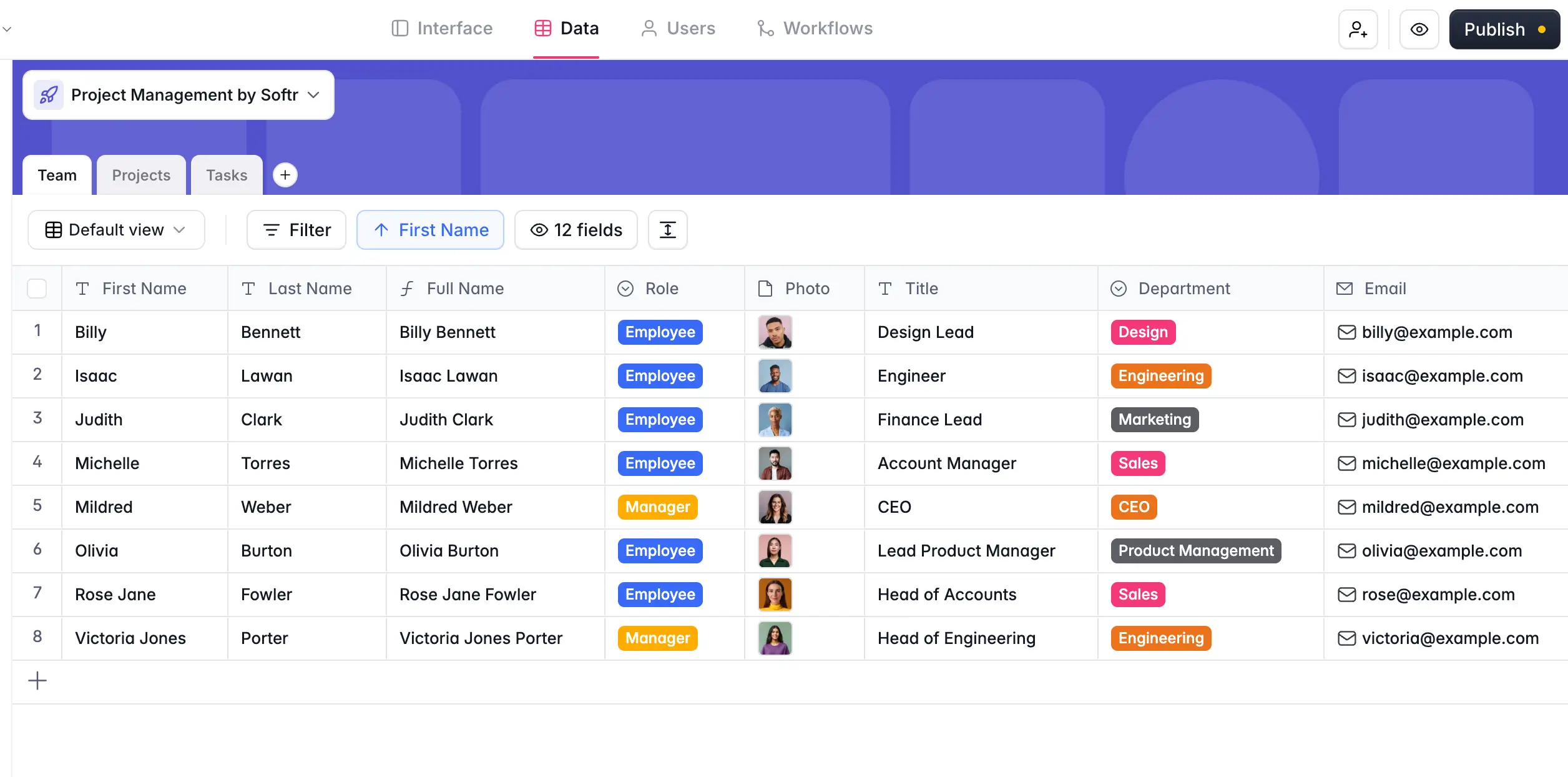
You can also combine data from multiple sources. Softr lets you use multiple databases in a single app or connect external tools like Airtable, Google Sheets, or SQL databases if you’re working with existing systems.
To make managing data easier, Softr includes AI agents that work directly within your database. They can clean, enrich, categorize, and summarize data as it’s added or updated, and help generate filters or formulas without needing technical expertise.
So instead of managing data across spreadsheets and disconnected tools, everything lives in one place — structured, connected, and ready to use across your app.
3. Backend logic
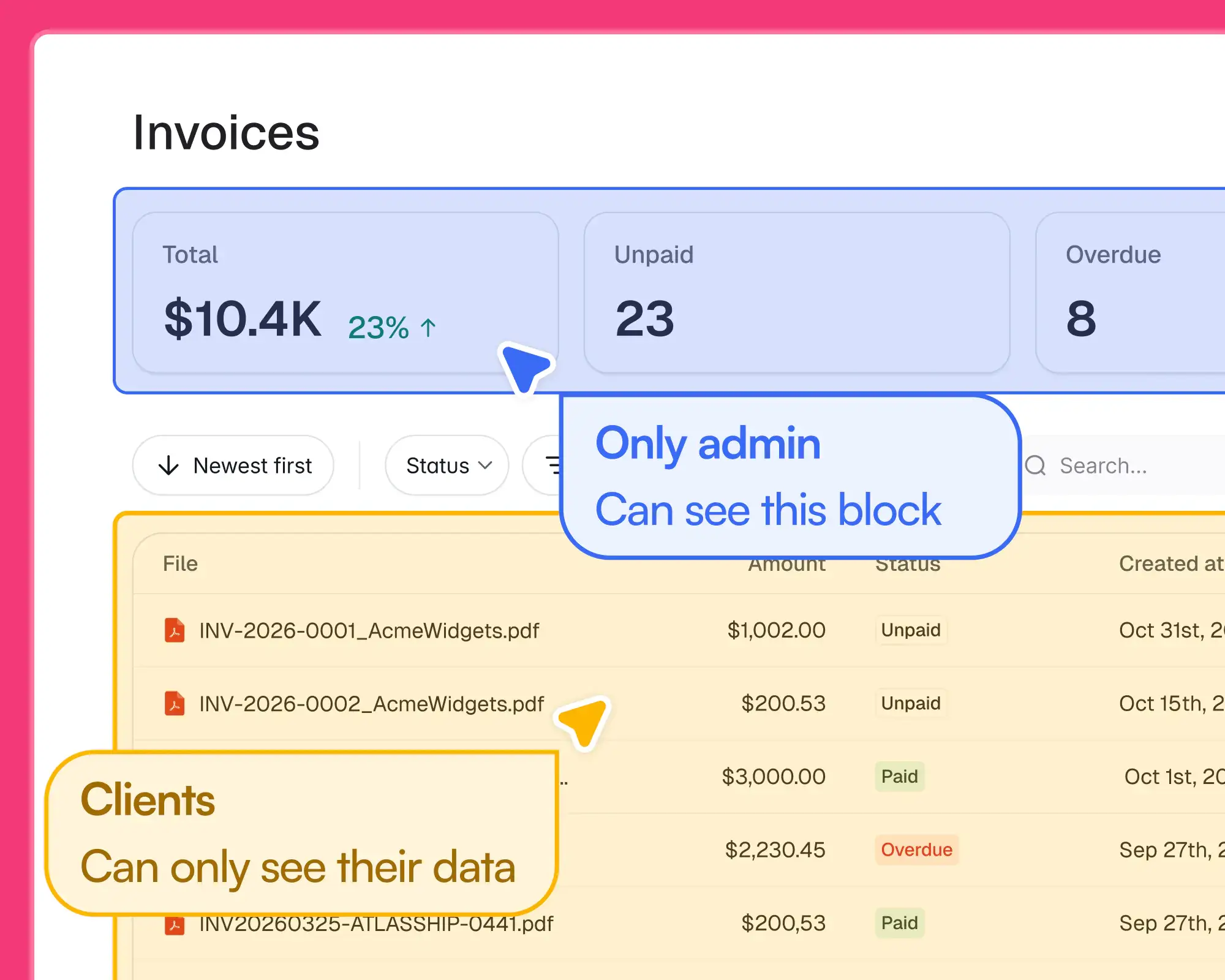
In Softr, the backend is already set up for you. The underlying systems that power your app—like APIs, infrastructure, security, performance, and scaling—are built in and connected, so you don’t need to create or manage them yourself.
Instead, you configure how your app behaves with:
- Authentication: configure secure logins via email/password, magic link, Google, or Single Sign-On (SSO)
- User management: create, delete, and manage users and user groups
- Permissions: control who sees what and which actions users can take in your app
- Business logic: define rules and workflows that govern how your app behaves and interacts with data
This business logic comes into play every time a user takes an action in your app, like submitting a form, clicking a button, or updating a record. It will depend entirely on the logic you’ve configured. In Softr, this is defined through workflow automation: rules that determine what should happen after an action occurs.
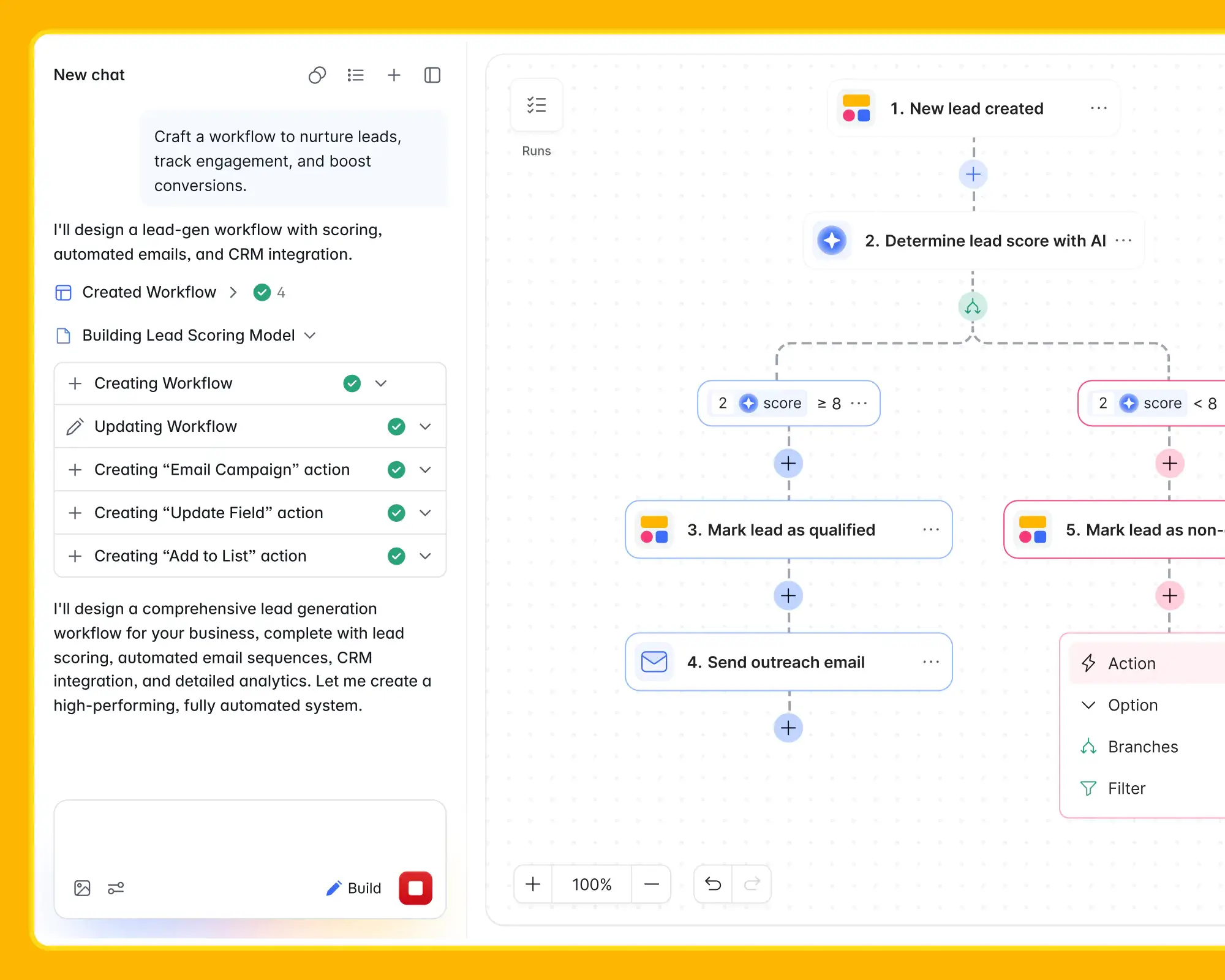
Softr Workflows can connect your app, your database, and the other tools in your stack. For example:
- when a form is submitted → create a record and notify your team in Slack
- when a user signs up → assign them to a group and send a welcome email via Gmail
- when a database record is updated → sync the change to Airtable or Google Sheets
You can also add conditions, filters, branching logic, and wait times to build more complex automations, all without writing a line of code.
In other words, what you build in Softr is a working product from day one, not a mockup you’ll need to rebuild later.
Build full-stack apps with Softr
The key takeaway is this: every app still relies on the same three layers (the frontend, backend, and database) working together. What's changed is how those layers get built.
With traditional development, you build and connect each piece manually. With vibe coding, you can generate parts of the stack quickly, but you're still responsible for making everything work together.
AI app builders like Softr take a different approach. Instead of generating isolated pieces, they create and connect the full stack from the start, so what you end up with isn't just something that looks like an app, but something that actually works as one, configured to fit your business and share with users.


Elena is an experienced writer, content marketer, and blog savant based in London, UK.
Frequently asked questions
- What does “full stack” mean?
- Do you need to know coding to build a full-stack app?
- What’s the difference between frontend, backend, and database?