12 vibe coding examples: Real projects built by non-developers


There’s a lot of talk these days about how vibe coding is “magic,” but talk means nothing without results to back it up. So, here are 12 real vibe coding examples of tools you can actually ship — all built by non-developers with Softr’s Vibe Coding block.
What is vibe coding?
Vibe coding is the process of building software by describing it to an AI model with natural language prompts. You explain the app or tool you have in mind, and the AI generates the code for you.
Most general-use LLMs can be used for vibe coding (Claude, ChatGPT, Gemini), but there are also purpose-built AI coding platforms and AI app builders (like Softr) with vibe coding functionality.
12 vibe coding examples
Each of the examples below was built by me or one of my colleagues using the Softr Vibe Coding block.
1. Bulk document uploader
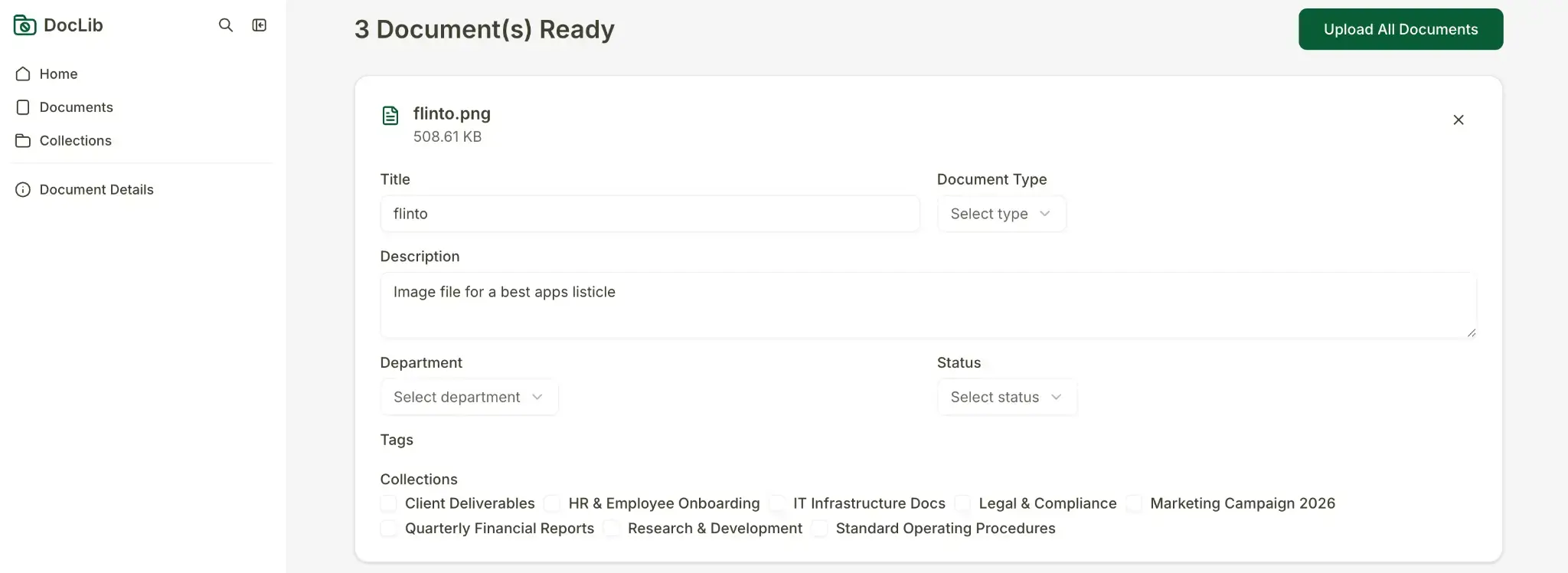
Guillaume Duvernay, Growth Marketer at Softr, vibe coded this tool for a document management app. It lets users bulk upload PDFs, preview them in a custom screen, and send them to the app’s database with a single click.
Here’s a basic prompt you could use to generate a similar interface:
Create a bulk document uploader. Users drag and drop multiple PDFs, preview them in a list, edit the title of each, and upload all of them at once.
Once the AI outputs a first version, you can make adjustments using the visual editor, or refine with further prompts.
2. LinkedIn post remixer

This tool was built for an employee advocacy app where team members can put their own spin on company-approved LinkedIn posts before sharing.
The Vibe Coding block generates a two-part interface: a read-only display of the original company post, and a text input where the employee adds their own perspective.
When a user clicks "Remix this post," the content is sent to a webhook that uses AI to generate a personalized version of the post in the employee's voice. The result populates a text field they can edit before saving.
3. CSV uploader with column mapping
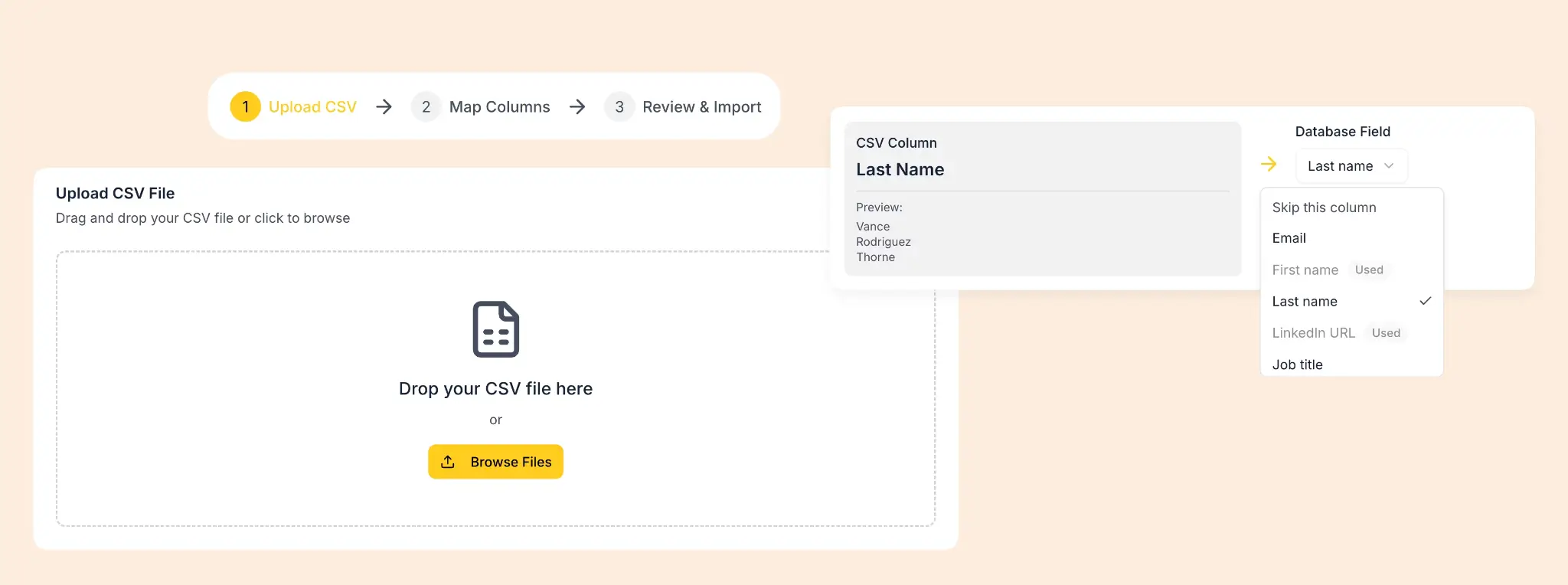
Here, we vibe-coded an interface that allows sales reps to bulk-import contacts from any CSV file. It includes the following elements:
- A drag-and-drop upload zone
- A column mapping interface where users match CSV headers to database fields
- Fuzzy matching to auto-map columns with similar names
- A review stage where the user can select or deselect certain rows before importing
This tool was generated in only two prompts with the Vibe Coding block. Once the first version was ready, we connected it directly to a Contacts database in our CRM (also built in Softr).
💡 Check out Guillaume’s video walkthrough for vibe coding a CSV importer.
4. Floating AI chatbot widget

This widget was built as part of an AI CRM app to give users a conversational interface for querying deal data without leaving the page. The Vibe Coding block generated a sticky chat bubble—pinned to the bottom-right corner—that opens into a full chat interface when clicked.
Users can ask plain language questions (like "Which deals are most likely to close?" or “Which accounts haven't been contacted in 30 days?”) and get answers pulled directly from their live CRM data.
Under the hood, the block sends each question via webhook to a Softr Workflow, which queries the database with AI and returns the response to the interface.
5. Drag-and-drop task calendar
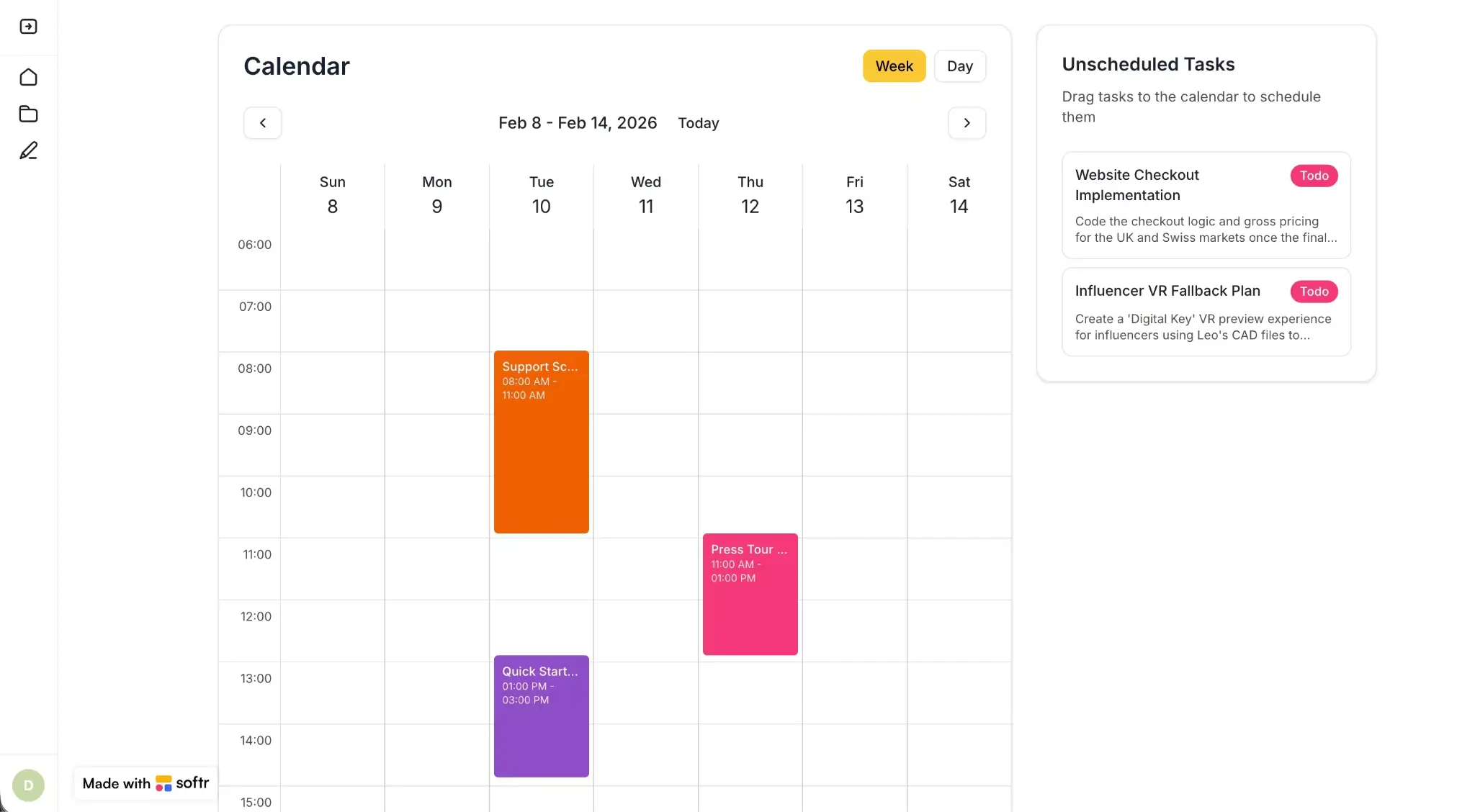
We used the Vibe Coding block to build a weekly calendar where unscheduled tasks appear in a sidebar and can be dragged onto open time slots. Tasks can be resized, edited with a click, and toggled between weekly and daily views.
The block connects directly to the Tasks database within a task management app, so everything stays in sync without manual configuration.
6. Custom rich-text editor

Notion users, this one’s for you. As a weekend project, Guillaume vibe-coded a rich-text editor with block-level controls, inline images, code blocks, and markdown rendering. Any pages you create live in the sidebar.
Normally, building something like this would mean writing custom UI logic. In Softr, it came together through a combination of prompts and visual editing.
7. Proposal builder with drag-and-drop sections

I vibe-coded this tool in Softr in less than 5 minutes. It gives users a split-screen proposal building view: a Section Library on the left (with pre-built blocks pulled directly from a Softr database), and a Proposal Canvas on the right (where sections are assembled and edited).
Users drag sections from the library onto the canvas, expand them to tweak the copy inline, and reorder or delete them as needed. When the proposal is ready, it can be previewed as a complete document and then exported as a PDF.
8. Interactive department view for company intranet

Guillaume vibe-coded this block for an intranet app to give admins and employees a quick overview of their organization by department. Clicking a department expands it to show the employees assigned to it.
Admins also get a "+" button on each department to add a new employee directly from the interface. Softr’s Vibe Coding block handles the full CRUD operation and automatically assigns the new employee to the correct department.
Here’s the prompt we used to build the initial version:
Display the different departments we have. Group users by their Department field. When we click on a department, show the employees assigned to that department. Include an option for admins to add a new employee to a specific department with a plus button.
9. Document diff comparison view

This vibe-coded interface displays two versions of a document side by side, with differences highlighted by color. It’s a specialized visualization that parses text, computes diffs, and renders them in the same view with precise formatting.
A developer would typically have to build something like this from scratch. Here, it was generated with a prompt.
10. Expense approval queue with swipe functionality
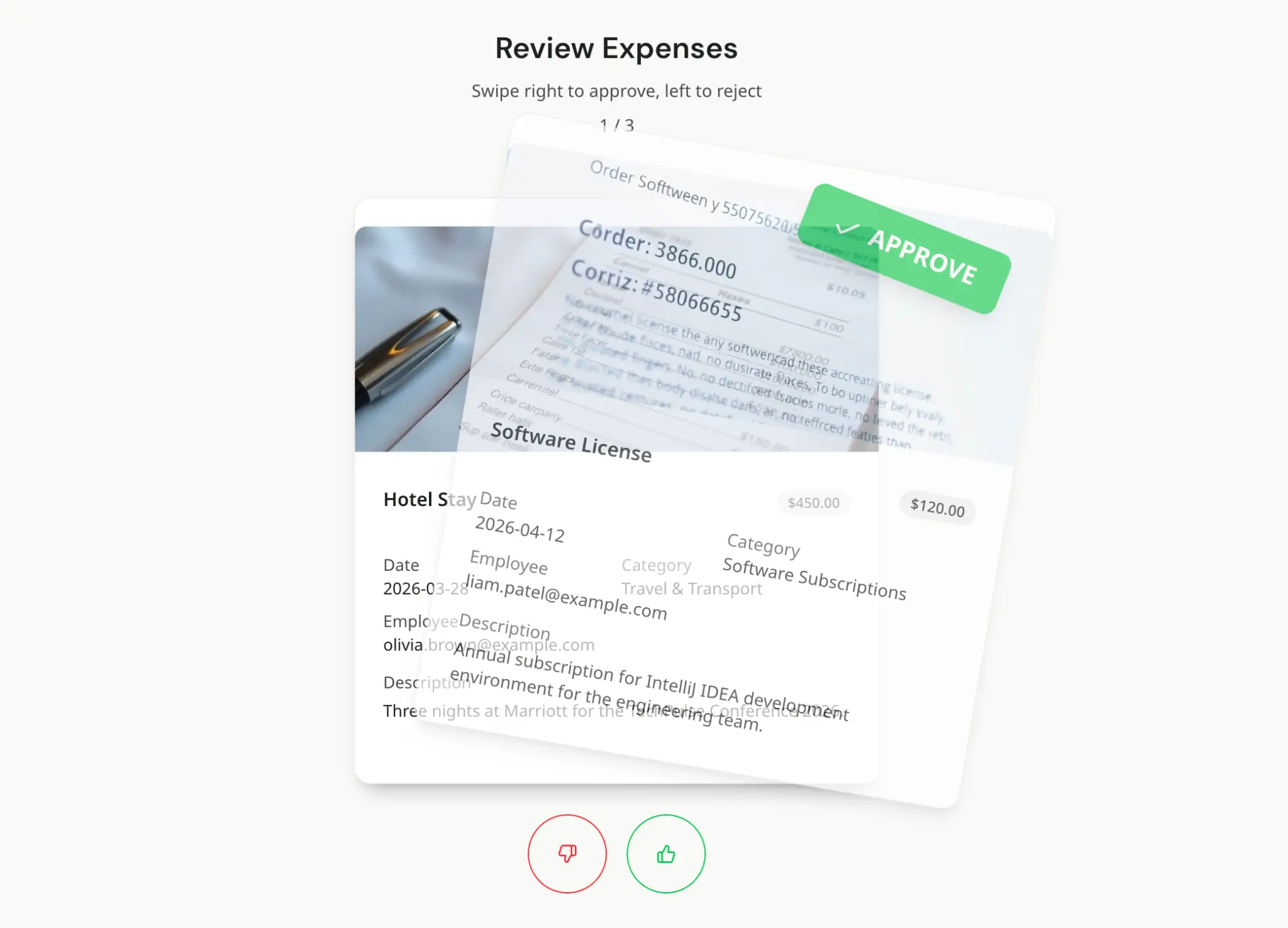
This vibe-coded interface turns expense review into a card-based queue: swipe right to approve, left to reject. Just like a dating app.
Each card shows the key details of a submitted expense: employee, date, category, amount, and description. Approvers can also click the thumbs up or down buttons at the bottom if they'd rather not swipe.
This UI lets admins work through expenses one at a time, making the review process focused and fast. I’ve tested it out myself, and it’s a lot more engaging than scrolling through a table or opening individual records.
11. Color contrast checker
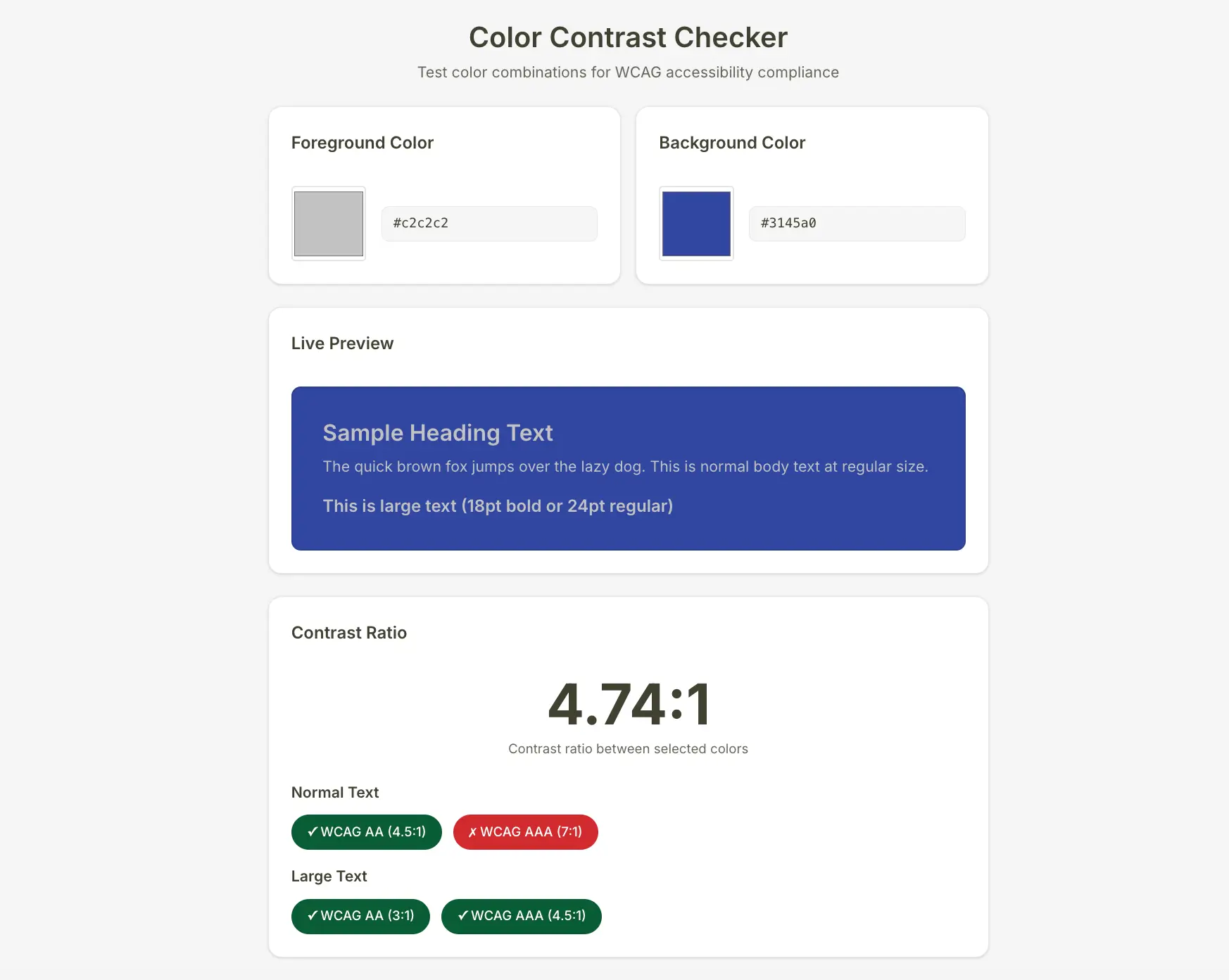
This tool lets you select a foreground and background color (by hex code or with a color selector tool) and see whether the combination meets WCAG accessibility standards.
A live preview shows how the colors look together across heading, body, and large text sizes, while a contrast ratio score below indicates which WCAG levels—AA or AAA—your color combo passes or fails.
It's a handy utility for a design or content team, and it took just one prompt to generate.
12. Monthly budget tracker

Most of the examples above are more advanced than your typical vibe-coded project. This one's a reminder that simple tools have their place too.
I prompted the Vibe Coding block to build a monthly budget tracker. You can input a budget, log expenses by category, and watch the progress bars fill up as you spend. This has an obvious business use case, but it can also work as a personal budget tracker.
How to vibe code your own tools
The vibe coding process can vary depending on the platform you’re using and what you’re trying to build. If you want a fool-proof way to generate tools and add them to your business apps, here’s a quick guide for using Softr’s Vibe Coding block:
- Add the Vibe Coding block and enter your prompt: Open the Softr app building interface, click Add block, then select AI → Vibe Coding block. Describe what you want to build in plain English. The more specific you are, the better. Limit your first prompt to a single feature rather than asking for everything at once.
- Connect a data source: If you want your block to display live data, go to the Source tab and connect a database and table. You can also add filters to control which records get pulled in.
- Re-prompt to refine: Describe what needs to be changed or added, being as specific as you were in your initial prompt. Every iteration gets saved automatically, so you can experiment freely and roll back to previous versions as needed.

- Configure actions and visibility: Use the Actions tab to set up create, edit, and delete functionality, and the Visibility tab to control which users can see the vibe-coded block.
- Test and ship: Before putting your tool in front of real users, test it thoroughly for responsiveness and unexpected behavior. If it works as intended, you're ready to go live.
Combine vibe coding with no-code to build business apps
In isolation, anything you vibe code will probably feel like magic. But playing around with an AI-generated calculator or landing page isn’t the same thing as sharing a vibe-coded app with real business users.
If you want to leverage AI to create secure, reliable software, it’s best to combine vibe coding with proven no-code infrastructure. Otherwise, you’ll have to manually configure authentication, permissions, data connections, and everything else that makes an app production-ready.
Softr is a no-code AI app builder with native vibe coding functionality. But unlike pure AI coding tools, it handles backend setup, security guardrails, and app logic by default.
You can generate working business software with the AI Co-Builder, or spin up custom components using the Vibe Coding block. Want to tweak an AI output? Switch to Softr’s visual editor to make changes without re-prompting.
👉 Try Softr free and start building an app today.


Dylan Reber is an experienced writer, content marketer, and SEO specialist based in Atlanta, Georgia.
Frequently asked questions
- What tools do you need to start vibe coding?
- Do you need to know how to code to vibe code?
- What's the difference between vibe coding and no-code?